Applies to BloodHound Enterprise and CE This page explains the JSON payload structure and minimum JSON schema requirements that BloodHound uses to ingest OpenGraph nodes and edges. Terms used on this page:
  • Schema-less (generic) data refers to OpenGraph payloads that follow the minimum node and edge schemas described on this page.
  • Schema-based data refers to OpenGraph payloads that use an extension-defined schema outside the payload itself.
This page focuses on the JSON requirements for schema-less (generic) data.
You can find the latest node and edge schemas in the BloodHound source code on GitHub.

Ingesting Schema-less (Generic) Data

File Requirements

Acceptable formats: .json, .zip You can mix file types in a single upload (e.g. Sharphound + Generic). Compressed ZIPs containing multiple file types are supported.

Data Payload Structure

The standard BloodHound UI upload screen accepts all OpenGraph payloads—both schema-less (generic) and schema-based. At minimum, your JSON file should have these elements:
{
  "graph": {
    "nodes": [],
    "edges": []
  }
}
The nodes and edges must conform to the minimum JSON schemas (see details below). BloodHound validates that the JSON is well-formed and that nodes and edges meet these schema requirements, but it does not enforce additional structure or constraints beyond them. When ingest completes, you can search OpenGraph data. Supported search methods depend on whether the data is schema-based or schema-less:
Search methodSchema-basedSchema-less
Node Search
Pathfinding
Cypher
Entity Panels: clicking on a node or edge will only render the entity’s property bag. At this time there is no support for defining entity panels for generic entities.

Nodes

Property Rules

  • Properties must be primitive types or arrays of primitive types.
  • Nested objects and arrays of objects are not allowed.
  • Arrays must be homogeneous (for example, all strings or all numbers).
  • An array of kind labels for the node. The first element is treated as the node’s primary kind and determines which icon appears in the graph UI. This primary kind is only used for visual representation and has no semantic significance for data processing.

Node JSON

The following is the JSON schema that all nodes must conform to.
{
    "title": "Generic Ingest Node",
    "description": "A node used in a generic graph ingestion system. Each node must have a unique identifier (`id`) and at least one kind describing its role or type. Nodes may also include a `properties` object containing custom attributes.",
    "type": "object",
    "properties": {
        "id": { "type": "string" },
        "properties": {
            "type": ["object", "null"],
            "description": "A key-value map of node attributes. Values must not be objects. If a value is an array, it must contain only primitive types (e.g., strings, numbers, booleans) and must be homogeneous (all items must be of the same type).",
            "additionalProperties": {
                "type": ["string", "number", "boolean", "array"],
                "items": {
                    "not": {
                        "type": "object"
                    }
                }
            }
        },
        "kinds": {
            "type": ["array"],
            "items": { "type": "string" },
            "maxItems": 3,
            "minItems": 1,
            "description": "An array of kind labels for the node. The first element is treated as the node's primary kind and is used to determine which icon to display in the graph UI. This primary kind is only used for visual representation and has no semantic significance for data processing."
        }
    },
    "required": ["id", "kinds"],
    "examples": [
        {
            "id": "user-1234",
            "kinds": ["Person"]
        },
        {
            "id": "device-5678",
            "properties": {
                "manufacturer": "Brandon Corp",
                "model": "4000x",
                "isActive": true,
                "rating": 43.50
            },
            "kinds": ["Device", "Asset"]
        },
        {
            "id": "location-001",
            "properties": null,
            "kinds": ["Location"]
        }
    ]
}

Edges

Edges names cannot contain dash -. It is highly recommended to use Pascal Case and no special characters. From tuple.nl: Pascal Case is a naming convention used in programming where compound words are written without spaces, and each word starts with an uppercase letter. It is commonly used for naming variables, functions, classes, and other identifiers in code. Pascal Case helps create descriptive and easily distinguishable names, contributing to the clarity of your code. See Neo4j Naming and Conventions for more details.

Edge JSON

The following is the JSON schema that all edges must conform to.
{
    "title": "Generic Ingest Edge",
    "description": "Defines an edge between two nodes in a generic graph ingestion system. Each edge specifies a start and end node using either a unique identifier (id) or a name-based lookup. A kind is required to indicate the relationship type. Optional properties may include custom attributes. You may optionally constrain the start or end node to a specific kind using the kind field inside each reference.",
    "type": "object",
    "properties": {
        "start": {
            "type": "object",
            "properties": {
                "match_by": {
                    "type": "string",
                    "enum": ["id", "name"],
                    "default": "id",
                    "description": "Whether to match the start node by its unique object ID or by its name property."
                },
                "value": {
                    "type": "string",
                    "description": "The value used for matching — either an object ID or a name, depending on match_by."
                },
                "kind": {
                    "type": "string",
                    "description": "Optional kind filter; the referenced node must have this kind."
                }
            },
            "required": ["value"]
        },
        "end": {
            "type": "object",
            "properties": {
                "match_by": {
                    "type": "string",
                    "enum": ["id", "name"],
                    "default": "id",
                    "description": "Whether to match the end node by its unique object ID or by its name property."
                },
                "value": {
                    "type": "string",
                    "description": "The value used for matching — either an object ID or a name, depending on match_by."
                },
                "kind": {
                    "type": "string",
                    "description": "Optional kind filter; the referenced node must have this kind."
                }
            },
            "required": ["value"]
        },
        "kind": { "type": "string" },
        "properties": {
            "type": ["object", "null"],
            "description": "A key-value map of edge attributes. Values must not be objects. If a value is an array, it must contain only primitive types (e.g., strings, numbers, booleans) and must be homogeneous (all items must be of the same type).",
            "additionalProperties": {
                "type": ["string", "number", "boolean", "array"],
                "items": {
                    "not": {
                        "type": "object"
                    }
                }
            }
        }
    },
    "required": ["start", "end", "kind"],
    "examples": [
        {
            "start": {
                "match_by": "id",
                "value": "user-1234"
            },
            "end": {
                "match_by": "id",
                "value": "server-5678"
            },
            "kind": "HasSession",
            "properties": {
                "timestamp": "2025-04-16T12:00:00Z",
                "duration_minutes": 45
            }
        },
        {
            "start": {
                "match_by": "name",
                "value": "alice",
                "kind": "User"
            },
            "end": {
                "match_by": "name",
                "value": "file-server-1",
                "kind": "Server"
            },
            "kind": "AccessedResource",
            "properties": {
                "via": "SMB",
                "sensitive": true
            }
        },
        {
            "start": {
                "value": "admin-1"
            },
            "end": {
                "value": "domain-controller-9"
            },
            "kind": "AdminTo",
            "properties": {
                "reason": "elevated_permissions",
                "confirmed": false
            }
        },
        {
            "start": {
                "match_by": "name",
                "value": "Printer-007"
            },
            "end": {
                "match_by": "id",
                "value": "network-42"
            },
            "kind": "ConnectedTo",
            "properties": null
        }
    ]
}

Post-processing

Post-processing in BloodHound refers to a series of steps during analysis phase where the system creates specific edges after ingesting data to enrich the graph and more accurately reflect the graph’s state. After ingesting data, BloodHound analyzes the graph state and adds edges that are essential to accurately represent the environment and support attack path analysis. BloodHound regenerates “post-processed” edges after it builds a complete graph. Before regenerating post-processed edges, BloodHound deletes any existing ones. As a result, BloodHound removes any post-processed edges that you add directly to an OpenGraph payload.
BloodHound creates the following edges during post-processing:
You can work around this behavior by including the supporting edges that cause the post-processing step to generate the edge that you want. For example, if you include an AdminTo edge directly in your OpenGraph payload, BloodHound removes it during post-processing and the edge does not persist in the final graph as expected. Instead of adding AdminTo edges directly, include the supporting edges that cause the post-processor to generate the AdminTo edge. The common pattern that triggers the creation of the AdminTo edge is: See the following example OpenGraph payload that produces the effect:
{
    "graph": {
        "nodes": [
            {
                "id": "TESTNODE",
                "kinds": ["User"]
            }
        ],
        "edges": [
            {
                "start": {
                    "match_by": "id",
                    "value": "TESTNODE"
                },
                "end": {
                    "match_by": "id",
                    "value": "S-1-5-21-2697957641-2271029196-387917394-2171-544"
                },
                "kind": "MemberOfLocalGroup"
            }
        ]
    }
}

Optional Metadata Field

You can optionally include a metadata object at the top level of your data payload. This metadata currently supports a single field:
  • source_kind: a string that applies to all nodes in the file, used to attribute a source to ingested nodes (e.g. Github, Snowflake, MSSQL). This is useful for tracking where a node originated. We internally use this concept already for AD/Azure, using the labels “Base” and “AZBase” respectively.
Example:
{
  "metadata": {
    "source_kind": "GHBase"
  },
  "graph": {
    "nodes": [],
    "edges": []
  }
}
If present, the source_kind will be added to the kinds list of all nodes in the file during ingest. This feature is optional.

Minimal Viable Data Payload

The following is a minimal example payload that conforms to the node and edge schemas above. You can use this as a starting point to build your own OpenGraph. Copy and paste the following example into a new .json file or download this example file.
When working with JSON files, use a plain text editor and UTF-8 encoding. Some text editors may introduce unexpected, non-standard characters that can cause parsing errors. It’s always a good idea to validate your JSON with a linter before uploading it to BloodHound.
{
  "graph": {
    "nodes": [
      {
        "id": "123",
        "kinds": [
          "Person"
        ],
        "properties": {
          "displayname": "bob",
          "property": "a",
          "objectid": "123",
          "name": "BOB"
        }
      },
      {
        "id": "234",
        "kinds": [
          "Person"
        ],
        "properties": {
          "displayname": "alice",
          "property": "b",
          "objectid": "234",
          "name": "ALICE"
        }
      }
    ],
    "edges": [
      {
        "kind": "Knows",
        "start": {
          "value": "123",
          "match_by": "id"
        },
        "end": {
          "value": "234",
          "match_by": "id"
        }
      }
    ]
  }
}
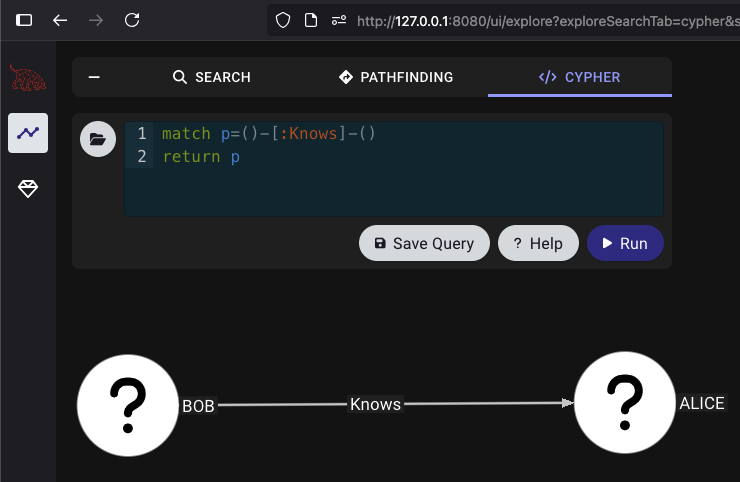
To test the ingestion in your BloodHound instance, navigate to ExploreCypher. Enter the following query and hit Run:
match p=()-[:Knows]-()
return p
You should get something that looks like this: BOB->Knows->Alice